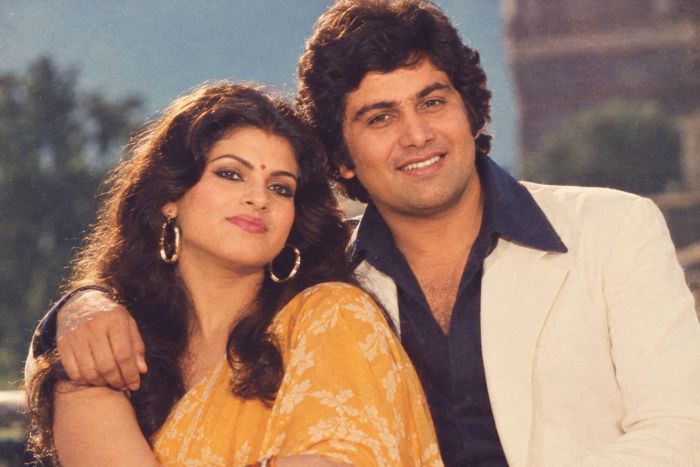
Scroll through Instagram or TikTok right now and you’ll see them everywhere — feathered hair, neon gradients, film grain, and that unmistakable mall-photo-studio glow. The 1980s AI photo trend has taken over social feeds, and unlike old-school retro filters, these images look like they were actually shot on a Kodak disc camera in 1987. No vintage wardrobe, no photo studio, no waiting for prints. Just a good prompt and a few minutes with ChatGPT or Gemini.
If you’ve been wondering how everyone is pulling off this look, here’s the full breakdown — including the exact prompts people are using to get that authentic 80s vibe.
What Is the 1980s AI Photo Trend?
The 1980s AI photo trend uses AI image generators to transform a regular selfie or portrait into a stylized recreation of an 80s studio photograph. Think:
- Soft-focus lighting with a warm or pastel color cast
- Big, voluminous, feathered or permed hairstyles
- Denim jackets, shoulder pads, and bold prints
- Laser-grid or smoke-and-neon photo studio backdrops
- Slight film grain and a soft glow around the edges
The trend blew up because it’s genuinely convincing — the AI doesn’t just slap a filter over your face, it reconstructs your photo as if it were taken with period-accurate lighting, styling, and camera equipment. That realism is exactly why it keeps going viral.
Why ChatGPT and Gemini Are Leading This Trend
Two tools are doing most of the heavy lifting here:
ChatGPT (using GPT image generation) lets you upload a photo and describe exactly how you want it transformed, then refine it conversationally — “make the hair bigger,” “add more grain,” “warmer lighting” — without starting over.
Gemini (Google’s Nano Banana image model) has become especially popular for this trend because it’s fast, free to try, and tends to preserve facial likeness well while still applying a strong stylistic transformation.
Both tools work off the same basic idea: you give them a source photo and a detailed text prompt describing the 80s aesthetic you want, and they generate a new image that blends your actual face and features with that retro styling.
How to Turn Your Photo Into an 80s Portrait (Step-by-Step)
Using ChatGPT
- Upload a clear, front-facing photo. Good lighting and a neutral background give the model more to work with.
- Write a detailed transformation prompt (see examples below) describing the decade, styling, and photo quality you want.
- Review the result and refine. Ask ChatGPT to adjust hair, lighting, color grading, or backdrop in follow-up messages.
- Request a higher-resolution version if you plan to print or post it in full quality.
Using Gemini
- Open Gemini and upload your photo directly in the chat.
- Paste in your 1980s-style prompt, being as specific as possible about clothing, hair, and studio backdrop.
- Generate the image, then ask Gemini to tweak specific details — Gemini responds well to short, direct edit requests like “add more film grain” or “make the background pink and purple.”
- Save and compare a few variations before picking your favorite.
The Best 1980s AI Photo Prompts to Try
Here are prompt templates people are actually using to get realistic results. Swap in your own details as needed.
Classic Mall Studio Portrait
“Transform this photo into an authentic 1980s mall studio portrait. Give me big, feathered, voluminous hair, a soft-focus lens effect, warm pastel lighting, and a laser-grid or smoky gradient background typical of 80s photo studios. Add subtle film grain and a slightly faded, nostalgic color tone.”
Retro Yearbook Photo
“Turn this into a 1980s high school yearbook photo. Add a denim or varsity jacket, feathered bangs, soft studio lighting, and a plain blue or gray gradient backdrop. Keep the film grain subtle and the colors slightly warm and muted.”
Neon 80s Glam
“Recreate this photo in a bold 1980s glamour shot style — teased big hair, dramatic blush and eyeshadow, shoulder-padded blazer, and a neon pink-and-purple studio backdrop with soft glow lighting.”
Vintage Polaroid Style
“Make this look like a genuine 1980s Polaroid snapshot — slightly overexposed lighting, warm color cast, visible film grain, soft edges, and a candid, unposed feel.”
Rockstar/MTV Era Look
“Give this photo an 80s rockstar aesthetic — leather jacket, teased hair, dramatic side lighting, smoky studio background, and high-contrast film grain reminiscent of an MTV-era album cover shoot.”
When writing your own prompt, the formula that works best is: decade + hairstyle + clothing + lighting + background + film quality. Hitting all six elements is what separates a flat, filtered look from a genuinely convincing 80s photo.
Photo Editing Tips for a More Authentic 1980s Look
Even with a strong AI-generated base, a little manual editing can push the result from “good” to “wow, is this real?”
- Warm up the color grade. Nudge the white balance slightly toward orange/yellow — 80s film stock rarely looked neutral.
- Add grain, don’t remove it. If your AI tool smooths the image too much, add a light grain overlay afterward for texture.
- Soften the focus slightly. A very subtle blur (not full softness) mimics the diffused studio lenses of the era.
- Boost contrast a touch. Old film had punchier blacks and slightly blown highlights compared to modern digital photos.
- Crop like a studio portrait. Tight head-and-shoulders framing sells the “sitting for a school photo” feel better than a full-body shot.
Common Mistakes to Avoid
- Being too vague in your prompt. “Make it look 80s” gives inconsistent results — specify hair, lighting, and background every time.
- Skipping the refinement step. Both ChatGPT and Gemini let you iterate — don’t settle for the first output if something looks off.
- Ignoring facial likeness. If the result doesn’t look like you anymore, ask the tool to preserve facial features more closely while keeping the stylistic elements.
- Using low-quality source photos. Blurry or poorly lit originals give the AI less to work with, which usually shows in the final image.
FAQs
Is the 1980s AI photo trend free to do?
Yes, in most cases. Gemini and ChatGPT both offer free tiers that can handle this kind of image transformation, though paid plans usually give you faster generation and higher-resolution outputs.
Which is better for this trend, ChatGPT or Gemini?
Neither is objectively better — Gemini is often praised for speed and likeness preservation, while ChatGPT tends to be stronger for detailed, conversational refinement. Many people try both and pick whichever output looks best.
Can I use these AI photos commercially?
Always check the current terms of service for whichever tool you’re using, since usage rights can vary and change over time.
Do I need a professional photo to start?
No — a clear, well-lit selfie works fine. Just make sure your face is visible and the background isn’t too cluttered.
Final Thoughts
The 1980s AI photo trend is popular for a simple reason: it’s fun, it’s fast, and the results genuinely look like they came out of a real photo studio decades ago. With the right prompt — decade, hairstyle, clothing, lighting, background, and film quality — ChatGPT and Gemini can both turn an ordinary photo into a convincing slice of retro nostalgia in minutes. Try a few prompt variations, refine as you go, and you’ll have your own totally convincing 80s portrait ready to post.
You Can Also Read: Passive Income Business Ideas for Beginners: The Complete 2026 Guide