
People no longer search only by typing. They snap a photo with Google Lens, circle something on their screen, upload a screenshot, or ask a spoken question. If your blog only works for typed keywords, you are missing a growing share of discovery.
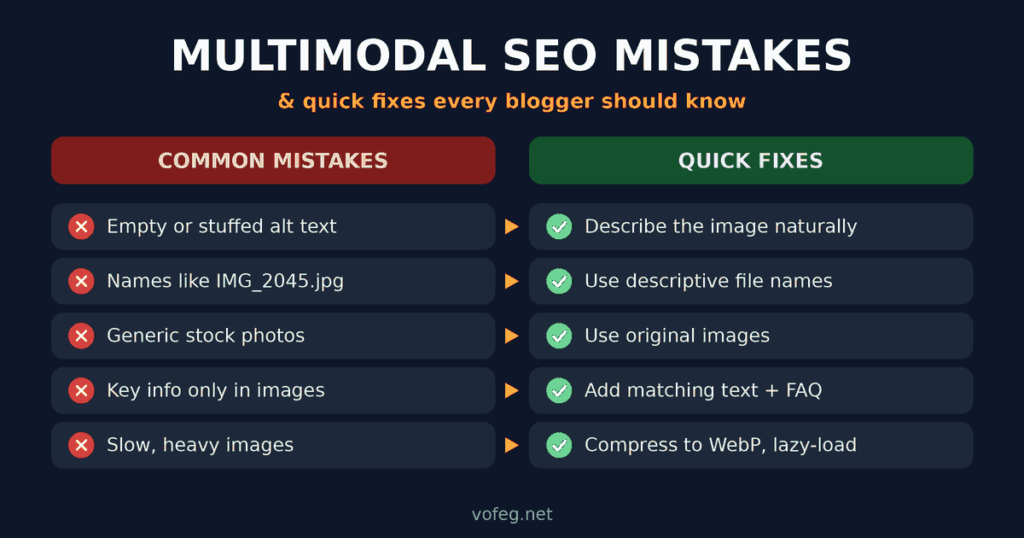
The good news is that most bloggers lose visibility because of small, fixable mistakes. Here are the most common multimodal SEO mistakes, and a quick fix for each.
What Is Multimodal SEO (in One Minute)?
Multimodal SEO means optimizing your text, images, video and audio so search engines and AI tools can understand them together. Google now even reports this traffic: in September 2026 it added multimodal data to Search Console, as announced on the Google Search Central blog. If you are new to the idea, this guide on how multimodal search works explains how Lens and AI search combine images, text and voice.
Mistake 1: Leaving Alt Text Empty or Stuffing It With Keywords
Empty alt text gives search engines no clue what the image shows. Stuffed alt text like “best seo tips seo blog seo image” is just as bad and looks spammy.
Quick fix: Describe the image the way you would to a friend who can’t see it. For example: “Laptop showing Search Console performance report on a desk.” Mention your keyword only if it fits naturally.
Mistake 2: Using Generic File Names
Files named IMG_2045.jpg or image1.png waste a free relevance signal.
Quick fix: Rename files before uploading, using short, descriptive, hyphenated names like google-lens-product-search.webp.
Mistake 3: Relying on the Same Stock Photos as Everyone Else
When hundreds of sites use identical stock images, there is nothing unique for visual search to connect to your page. Original photos, screenshots and custom graphics are easier to match with your content.
Quick fix: Use your own screenshots, product photos, simple diagrams or infographics wherever you can. Even a clean, annotated screenshot beats a generic stock picture.
Mistake 4: Putting Important Text Only Inside Images
Infographics and screenshots are useful, but if the key points exist only inside the picture, search engines and screen readers may miss them.
Quick fix: Repeat the main points as normal text near the image, in a short caption or a few lines of explanation below it.
Mistake 5: Ignoring Page Speed and Image Size
Huge image files slow your pages, especially on mobile, where most visual searches happen. Slow pages frustrate visitors who arrive from Lens or image results.
Quick fix: Compress images, use modern formats like WebP, set proper dimensions, and lazy-load images below the fold. Most WordPress image optimization plugins can do this automatically.
Mistake 6: Forgetting Captions and Surrounding Context
An image sitting alone between paragraphs makes it harder to connect the picture with your topic. Search engines use nearby text, headings and captions to understand what an image is about.
Quick fix: Place each image close to the paragraph that explains it, and add a short caption when it helps the reader.
Mistake 7: Skipping Structured Data
Without structured data, engines have to guess what your content is. Article, image, video and product markup help them understand your page more clearly. Google lists supported types in its structured data gallery.
Quick fix: Use an SEO plugin to add Article and Image markup, then test the page with Google’s Rich Results Test. If you prefer to avoid plugins, learn how to add schema markup in WordPress step by step.
Mistake 8: Not Optimizing for Voice-Style Questions
Spoken searches are longer and more conversational, such as “how do I make my images show up in Google Lens?” Posts written only around short keywords often miss these questions.
Quick fix: Add a short FAQ section to your posts with direct, one or two sentence answers to natural questions. This also helps you appear for “People also ask” style results.
Mistake 9: Not Checking Your Data
Many bloggers publish and never look at how their images perform. Since Search Console now separates text-based and multimodal searches, you can see which pages appear when people search with an image. Note that it shows the pages and their visibility, not the photo the person searched with.
Quick fix: Open Search Console, go to the Performance report for Search results, and look for the multimodal option under Web in the search type filter. It is rolling out globally, so if you don’t see it yet, check back in a few days. Record a baseline now so you can compare later.
A Quick Multimodal SEO Checklist
Before you hit publish, run through this list:
- Does every image have clear, natural alt text?
- Are file names descriptive?
- Is at least one image original?
- Are images compressed and fast to load?
- Is key information also written as text?
- Does the post include a short FAQ?
- Is structured data in place?
- Is the featured image set, and does it display properly when shared? A tool like the LinkedIn Post Inspector can help you check how your preview looks.
Frequently Asked Questions
Is multimodal SEO different from image SEO?
Image SEO is one part of it. Multimodal SEO also covers video, audio, voice-style questions and how all these formats support the same topic on a page.
Do I need special tools?
No. Alt text, good file names, original visuals, fast pages and structured data cover most of the work. Search Console is the main tool for tracking results.
How do I optimize for Google Lens?
Use clear, original photos with descriptive alt text and file names, place them next to relevant text, and keep pages fast on mobile.
Will this help my regular rankings too?
Often yes. Better images, clearer content and faster pages improve the experience for every visitor, which is good for SEO overall.
Final Thoughts
Multimodal SEO is not about doing something completely new. It is about making every part of your page, from the text to the images to the markup, easy to understand. Fix these nine mistakes one at a time, start with your top-performing posts, and you will be better placed as visual and voice search keep growing.